Desertcart purchases this item on your behalf and handles shipping, customs, and support to China.
📡 Stay ahead of the signal—never miss a beat with the ultimate handheld scanner!
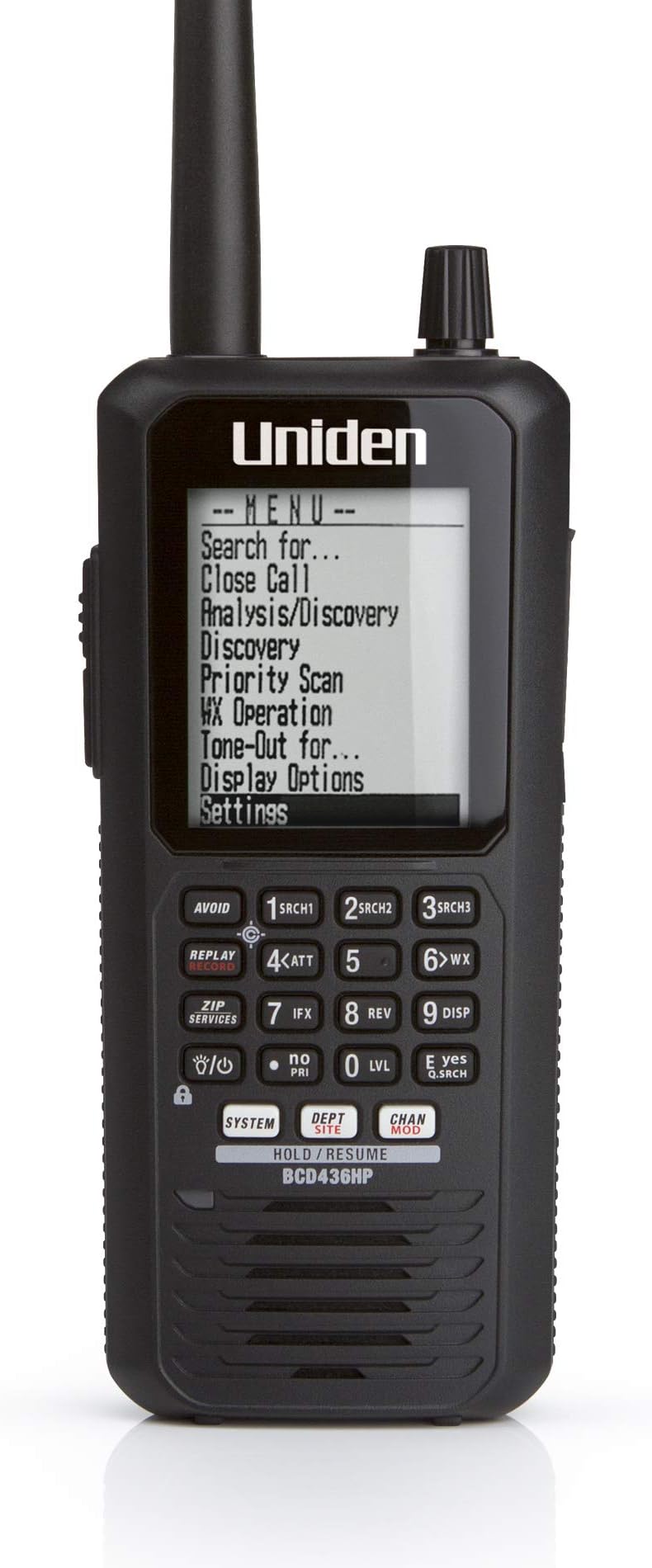
The Uniden BCD436HP HomePatrol Series is a cutting-edge handheld digital scanner featuring GPS-enabled location scanning, an ultra-large display, and rapid 85-channel-per-second scan speed. Designed for professionals and enthusiasts alike, it covers a vast frequency range (25-1300 MHz) including analog, digital, and trunked systems across the USA and Canada. With plug-and-play ease, customizable alerts, instant replay, and future-proof firmware updates via Sentinel software, it delivers unmatched convenience and performance in a lightweight, water-resistant form factor with up to 8 hours of battery life.


| ASIN | B00I33XDAK |
| Additional Features | Weather Alert |
| Battery Average Life | 8 hours |
| Best Sellers Rank | #12 in Radio Scanners |
| Brand | Uniden |
| Built-In Media | Uniden BCD436HP HomePatrol Series Digital Handheld Scanner |
| Color | BCD436HP |
| Compatible Devices | GPS devices, Uniden devices with Close Call RF Capture feature, Headsets/Earpieces with display and keypad compatibility |
| Connectivity Protocol | GPS |
| Customer Reviews | 4.2 out of 5 stars 3,431 Reviews |
| Frequency Range | 25-512 MHz, 758-824 MHz, 849-869 MHz, 894-960 MHz, 1240-1300 MHz |
| Global Trade Identification Number | 00050633650721 |
| Item Dimensions D x W x H | 2.4"D x 3.8"W x 9.02"H |
| Item Type Name | HomePatrol Series Digital Handheld Scanner |
| Item Weight | 16 ounces |
| Manufacturer | Uniden |
| Mfr Part Number | BCD436HP |
| Model Number | BCD436HP |
| Number of Batteries | 3 AAA batteries required. |
| Number of Channels | 85 |
| Special Feature | Weather Alert |
| Tuner Type | UHF |
| UPC | 807032945633 012302971377 796793121014 700736730966 012301804379 796327844549 605384321941 797749704404 087018541169 050633650721 801029663883 |
| Unit Count | 1 Count |
| Warranty Description | 1 year |
| Water Resistance Level | Water Resistant |
E**R
For A Busy Dad, This Plug & Play Scanner is Perfect
With over 700 reviews of this product, there is a lot of material out there. If you're like me and have limited time to read reviews, let me sum this product up for you: 1. It is plug & play. Enter your zip code and it knows what frequencies to scan in your area. Game on! 2. If you travel, buy the Uniden-brand GPS unit available on Amazon (Uniden BC-GPSK Serial GPS Receiver for Scanner and Marine Products). The reason to buy the Uniden unit is A) As you travel, the GPS feeds your location into the scanner and the scanner updates the frequencies it is scanning to those near you and B) because it is also plug & play. Mine arrived with the necessary cords to plug directly into the scanner, and it worked from that moment. Perfect! 3. You can connect the scanner to your PC to update the firmware and the frequency database from Uniden. It is easy. No need to buy a third-party web database. Uniden regularly updates their database. I purchased my unit in 9/2014 and used it nine months before performing updates. It works fine out of the box. 4. The scanner has two batteries, a main battery for scanning and a secondary battery for the clock. Charge the main battery first, then turn on the scanner to charge the secondary battery. Oddly, the clock battery charges when the unit is on. 5. On trips, an external antenna will extend your range. I purchased a magnetic mount antenna on Amazon for about $30 (ASIN B004HM9RHE) and it works great. Almost a plug & play device, you do not need an SWR meter as it is pre-tuned. Plug & play caveat: You will need a BNC Female/SMA Male Adaptor (ASIN B00CLFFM4G) to plug the antenna into the scanner. 6. When using in a vehicle, know the law. States may have laws restricting scanner use in a vehicle. UPDATE: As of May 1, 2006, a permit from the Michigan state police is no longer required to have a scanner in your vehicle on Michigan roadways. I have been told by the Ontario Provincial Police it is legal to have a scanner in a vehicle in Canada but have not been able to find the law on the books. UPDATE: March 7, 2021: A Spectrum Management Officer of the Canadian Innovation, Science and Economic Development department (Canada's equivalent to the U.S. Federal Communications Commission) wrote me that an amateur radio operator's license is required to use a scanner in a vehicle in Canada. Canada recognizes U.S.-issued amateur licenses, so if you're a licensed ham operator, you're set. 7. That's it. This scanner is as simple or complex as you wish it to be. For a busy dad, the simplicity is welcome and the Plug & Play No Fuss Ready-to-Use attributes actually let me enjoy the thing without brushing off my kids to learn how to make it work. It reminds me of the original Apple MacIntosh computer: A product so smart you can turn it on and use it without devoting hours of study to get it to function :-)
R**N
Great Unit & Future Proof
Make sure you read the review item next to the name of the user. Amazon mixes reviews of different units in one. Before I get into the scanner I would like to address some complaints in general on scanners and the frustration of programming and using them and resulting in a bad review and complaints about a scanner be it a simple scanner or a complex one. Radio systems (simplex, trunking, digital, etc) and all the frequencies assigned worldwide is a complex matrix. It's not a simple as scanning every frequency under the sun to find some activity, its more complex. And truth be told 95% of scanner enthusiast like the complexity as it adds to the hobby. Learning and gaining knowledge and always figuring out new tricks, etc. If it was simple it would not be a fun. But there are some who want quick and easy. So you must to 1 of 2 things. 1: Make sure any scanner you purchase you can hook up to the computer (some use serial so be patient) and use FreeScan software (free) and subscribe to a frequency database. It's cheap and worth it. I paid 30 a year that's pennies a day to have an awesome database at your fingertips. This will load and label all the systems in your area and put them on the scanner. 2: Purchase a more expensive with a built in database and other features (like this Uniden 436HP). Even if you do #2 it's always good to do #1 also. And be patient. While watching TV or hanging out, mess with the scanner nightly and learn little things as you go. Watch some videos on YouTube like Scanning 101, etc. Enjoy the process and do not get frustrated. On to my quick review of the BCD436HP. I had purchased the BC346XTC and used it for a week. Great unit highly recommend if you want analog with trunking. I wish the display was bigger so you can see more of the 3 areas system, dept and channel. But it worked great and I rated it 5 stars. But I wanted something digital with a larger display so I plunked out more than double the price of the BC346 for the BCD436HP. Love the large display, it really shows a lot. A separate line for the system, department and channel which you can hold each one and scan subs of them. When I first turned it on I entered my postal code and was scanning in minutes. The BC346 I had to manual scan or load it with FreeScan to get it really working. I have not hooked the BCD436HP to the computer yet but will this week to load detailed databases. This has a ton a features and essentially has unlimited channels (no cap). Firmware will future proof this unit. It pretty much does everything (trunked, digital, etc). The Micro SD card is a great feature to load a ton of databases and this unit will record and playback transmissions. Some users commented on the cheap feel of the unit. That's a slippery slope with a lot of opinions. Its light weight and feels good to me, the plastic is not super tough industrial but Uniden most likely weighed the pro and cons. Example: A Motorola VHF 2 way 99% of the time will be used in a work environment and be dropped, thrown on a dash or ledge, etc. That is why they also do not put displays on most of them for durability. Now a scanner is typically a hobbyist device and I can imagine 95% of the time it would not be used in a rugged work environment, so to me Uniden chose well with light weight plastic. The display screen plastic seems like it may get scratched easy but I have not had it long enough determine that. Some people do not like the Uniden clip on the back since it sticks out, but if you see why they did that it nice. It's basically the same CB mic mount to when you take the clip off it slides real nice into a CB mic mount. I bought a CB mic mount and use it in my van. Very nice feature. Battery life is dependent on processing, led, etc. I have not used it long to determine but if I had to charge it every night no big deal. Bottom line with anything you buy there is always things some people like and others do not. Is this unit a little pricey, probably but then it has a lot of R&D in it and they do not sell tons of them so there has to be a price point to make money. So I am ok with the price. You basically have a little computer in your hand ready to scan the RF Spectrum and should be future proof for a long time. If your trying to figure out if you like scanning buy a smaller Uniden or Whistler and program it via your computer and check it out. If you want to move up into the full spectrum (trunking, digital, etc) then you need something like this. I would recommend this to someone who knows what they want and ready to shell out a few bucks. For a beginner maybe start smaller. I had a chance to mess with hooking this up to my computer. Turns out the FreeScan does not support this unit. BUT Uniden makes free software for this called Sentinal which has a real good database with it. Its all installed on the 436 already so you really do not need to use the software unless you want to make easy edits or import stuff from freescan, etc. Sentinal software may not be as in depth for the hard core seasoned scanner users but for me its good. So in reality the BCD436 is a unit that will have you scanning in minutes with little to no programming and has the capability for the seasoned users to program till the cows come home. Update: I love this scanner. The screen showing all the info is great. The hold for each area is awesome I cannot say enough about that. I have NOT needed software like on other scanner I have used. Maybe I will one day but Uniden shipped this will ALL the frequencies in my area and nationwide for the most part!
K**E
Good product, worth the purchase and cost
The last scanner that I purchased was in the 80’s. Man they’ve come a long way! The ease of use for basic features like zip code scanning is really simple. I didn’t need the book to tell me. You can choose the type of services that you want to receive press zip code entry set distance and sit back and enjoy. As you receive a freq that it stops at you can store it in a bank that you name yourself and if that isn’t enough you can temporarily avoid that one and move on. A huge upgrade to less functional scanners is that the 436 tells you what the freq belongs to, no more book or internet lookups for what it’s for. That’s basic features I have yet to delve into the complete features that the 436 is capable of. It’s very intimidating. Purchasing a longer range antenna, a Bluetooth transmitter as this scanner does not have Bluetooth built in. I don’t like to use corded ear phones and much prefer Bluetooth. Purchase 3 extra rechargeable batteries and a battery charger so that you have extra batteries to install when others die. The unit has a built in charger but it’s major downfall is that the scanner doesn’t charge when the unit is on. I hate built in chargers anyway. Don’t bother with non rechargeable batteries, even the best brand will die quite rapidly. The quality of the casing is of poor quality, if dropped it will surely break. Buy a leather covering for protection, I’ve already inadvertently knocked it over. The base is very small so it does not provide a substantial surface to stand up very securely fortunately it’s of good weight so it stands adequately. I’ve ran the buttons and knob through there paces and they’ve upheld well. UPDATE: The channel knob is failing. It loosened up and is so sensitive in the functions it’s used for that it has a mind of its own so the screen selection jumps anywhere it feels like it. Again the features are beyond my scope of knowledge. I’m looking forward to learning all of them. I’m glad that I waited to submit this review. I purchased the home base equivalent of the 436. It operates the same functionality with just a few button location mods. I also purchased the upgrade handheld, the SDS100. It’s a hundred dollars more than this one and it’s being returned. The SDS does not have the speaker quality the differences is water proofing, I don’t use them under water, the battery is unique of course so you’re pressured to purchase the exact battery. I just can’t get around the sound quality. I mentioned that the selection knob is failing which led me to the SDS. But I don’t like the SDS so I bought another 436. If you enjoy scanning and beyond features that this one has the I highly recommend the 436. The price is right for what it has to offer.
R**G
Very Good Item! Simple basic setup. Some learning required for New Users.
This is a very good scanner, and fairly easy to set-up. You simply attach the pieces in the box to it like the antenna, carry clip, and install the 3 AA rechargeable batteries which will not be charged so I had to plug it in to a USB port charger to power up until the batteries were fully charged. The cord plugs into the bottom of the 2 ports on my scanner, and the top port is for adding GPS Then I simply powered it on set my time which may be slightly confusing at first, set the backlight which I watched a YouTube video to learn. Lots of helpful how to YouTube videos on this model, and then you will be prompted to enter your zip-code, and it will automatically download most of your local frequencies within 20 miles.I found this to work very well to hear my local police but I had to open my menu and get to the area where I could choose and check other things like local fire, utilities, RR, Aviation and many other choices. However, this is where it gets more complicated. You will find a lot of online and very helpful articles and videos on the subject of firmware and database updates. You will also need to download your models Uniden app on your laptop or PC to load updates. Take your time and use whatever help and learning materials you can find and the instructions on the Uniden page, and you will be able to get it done. So I would say after getting through that part of it, I am relaxing and back to listening to everything in my area and enjoying it. There are also ways to set-up favorites, and a lot of different features, but for now I'm just going to let it scan through everything in my area.
K**.
What a over complicated nightmare not practical or convenient in anyway!
This is a new revision of my first thoughts about this migraine inducing device! After a few hours of trying to setup this thing to work the way I want all I got was everything being broadcast in my state and 3 others around me!!! Trying to figure out how to tell it only to scan a few local agencys has pushed me almost to use it for target practice! There is no way to simply set it up using the ZIP code method! I tried the Included Sentinel software but it's a joke! Then I tried a trial of Butel ARC pro that's another story all together it's doesn't read the scanner the same way it does my 996p2! The way this was designed is so different from the non Home patrol scanners you have to take a course just to learn how to program it past the ZIP code method! If you want to hear everything out there then this is for you! If you want just your local PD and Fire forgot about it!!! I thought the 996p2 was difficult but I'm better off just taking that scanner with me on my vacation and keep a radio reference account active! And use my Hotspot and laptop to program it when I want to scan something local! And the other thing is this scanner is not road ready unless you buy a case of AA batteries because it need extra hardware to plug it in to your vehicle! And not use the batteries! This scanner has so much potential but whoever signed off on it's final design was out of there minds if they thought it was going to Appel to the general public! It's going back I am done pulling my hair out over it! I don't need portablilty this bad!!! And it's not portable out of the box in any way!?! Don't waste your money on this for the "misleading convenience" of the Home patrol it's a very bad implitation of a good idea! I am a retired network administrator and have owned scanners in the past this is not for the general public! At best it's a specialty item for hardcore enthusiast!!! I'f you don't understand The thinking behind the way it was designed you will be spending hours, days ,weeks maybe months trying to learn how to use this in a practical way.
R**.
BCD436HP A winner!!
I recently Purchased the BCD436HP Scanner as my local PD switched to digital. I have to say this is the best scanner I've ever owned. It's amazing how much technology changes and how many features are included with this scanner. I chose this scanner over another brand just because I've owned Uniden's before. And I wanted the keypad interface. A scanner without it is useless to me. Now I have read some of the negatives of this unit. Frankly some of them are gripes but for me they are not a deal breaker. The advantages far out weigh the negatives. One thing I was concerned about was some people said that the Conventional frequencies are not strong at receiving. I live in the suburbs of Chicago and pick up Chicago P.D.that is over 30 miles away inside my house with an Diamond SRH77ca antenna. Anybody who knows anything it's hard to build a dedicated receiver to cover so much and be sensitive to all frequency ranges. I'm happy with the performance. As far as programming, I'm an IT professional. Anyone who has worked with trunked systems before know that it gets more complicated than conventional frequencies. There were many new things that I did not understand how this scanner did. However I'm learning them day by day. And it's fairly easy once you poke around enough. Im finding it very easy to program and use. Pro's: All frequencies covered Digital, Trunking, Conventional Recording feature Big Display Close Call Capture Technology Computer Programmable Keypad Unlimited Frequencies storage GPS Capable Zip Programming Negatives: Display can be hard to read at times due to glare but, You just tilt the radio downwards. Adjust the brightness and contrast. Some of my ham radio's suffer the same curved screen problem. Better Manual Needed. But Was fairly easy for me to figure out. I don't think the Internal battery charger is timed. So possibly overcharging of batteries. Internal clock needs to be set if you don't use scanner frequently enough. Firmware update allows it not to bother you to set it anymore. But when you go to do your record feature for example it will store the wrong date/time on recordings if time was lost.
J**Z
Great unit, even with the scary price tag.
It's a weird feeling to spend so much money on a handheld scanner. I can recall buying them for around $100, and knowing they'd be quality. Now, $300 doesn't guarantee that you'll love the product. But sometimes it does. I absolutely love this scanner. I truly thought that some of the features were gimmicky, and might not work well. For example, one function allows you to search for nearby frequencies. On older units, this was a guaranteed way to find the nearest drive-through, since the radios they use tend to be highly powered, and stomp other frequencies. This unit has changed the way the function works, and without explaining it in detail, I can say that I'm ecstatic with the functionality. "Why is this better than an app on your phone?" I have a scanner app on my phone, and I use it regularly. I also have an old Radio Shack handheld unit, and this new unit. The app is amazing, truly. However, the app is limited to your cellular signal, and it doesn't give you the control to fine-tune your frequencies. You're locked into a bank of nearby channels, pre-selected for you. The Uniden gives you an incredible amount of control, as well as thorough information on the channels. ”OK, but it's going to take weeks to program properly!” Not at all, actually! The included software has the majority of channels, organized by state and county, and allows you to pick and choose. Learning the software can be a bit tricky at first, but I found a video online that helped me to figure it out in minutes. Once I knew the functions, I was off to the races, and had my scanner working and receiving traffic within 15 minutes. I have since fine-tuned, and even added my own channels. There are some great online resources for frequency lists, and you can find some great and obscure channels. I carry this scanner everywhere with me, which is not typical. I don't like carrying things with me all the time, and do it with very few items. This has become one of those, because it is a wonderful piece of technology. I have gone to rechargeable batteries, however, because this unit can eat batteries if you run it constantly. "Is it worth it?" Without question, if you have the money to spend, you'll love this unit. It has quirks - I'm not a huge fan of the squelch/volume control, since you have to press a button to change the mode of a single rotary switch, rather than having dedicated switches. That said, I don't change the squelch every 5 minutes, and it isn't enough to make the unit terrible. I'd buy it again without hesitation.
D**.
so close yet, so far
I like to use a scanner to monitor events (fire, police, etc...) around the house, listen to weather spotters, listen to aircraft, so I thought having the frequency database built in would be great. It is - but unfortunately Uniden doesn't understand user interfaces and EVERY FUNCTION is buried beneath a quagmire of menu selections. The scanner works great! Battery life is solid. build quality is good as well. There are a couple of (not so) little complaints that I have. First - and this is huge: You can not charge the batteries WHILE using the scanner. You can either scan or charge. This to me is a huge setback. This day and age you should be able to do both. The radio isn't big so add a little space for a recharge circuit. Second - you cant really use it mobile. Since everything is buried in menu's you can't really do anything while driving. It even takes 2 clicks to adjust the volume. To me, and I'm a very novice hobbyist, there is a lot of needless complexity to the menu. Third - the software is probably the worst written thing I have ever used. (I'm an IT Project Manager, so I've seen a lot of bad code). You have to have the software in order to update the database. you also want to use it so that you can add "favorites" or "lists" (these are frequencies that you divide up - for example Airport, or local police, etc...). It is possible somehow to make these lists on the scanner, but I have no idea how. You would think you would just add frequencies to a list in the software and upload it to the scanner...no, no, no...if you do that you end up erasing all your stored favorites. Honestly, I have no idea how to make it work. I usually end up watching a youtube video and following along. fourth - frequency holds. you have 3 frequency hold buttons: one for system, dept and channel. sounds great doesn't it? Except that by the time you get to the scanner, find the button and press it, it has already started to scan. Of course there is a delay so you end up holding a non-related frequency. You can try to scan backwards, but usually you end up missing the entire transmission. It's a good scanner, but it does have some pretty big tradeoffs. The internal database is great, but the terrible UI and software is just maddening. couple that with no ability to charge while listening and you have a recipe for mediocrity.
H**.
Great unit
Este scanner es altamente recomendado. El hecho que la base de datos no esté disponible fuera de USA o CAN no es problema si estás en el hobby para descubrir e identificar frecuencias. Gran calidad de recepción. El software Sentinel facilita enormemente la programación.
L**A
Bom estado radio usado
Em prefeito estado não dou 5 estrelas porque e radio scanner usado
ア**ん
サポートはシッカリシテソウ。
海外からの輸入品のため、箱が破れ潰れていましたが、税関検査の影響とのかのうせいがあり、 間違い無く商品は新品であり、故障時は、3年間の無償修理まで対応してくれるそうです。 国内で飼うより1万円以上やすかったので満足しています。 国内のメーカーですが、アメリカ仕様のため、サーチして聴くと言うのがメインの為、慣れるまでは 大変ですが、サーチが早く、その上で弱い電波でもシッカリ止まってくれます。 また、周波数カウンタトシテノキノウモシッカリシテオリ、DJ-X11より感度がよいです。
A**O
You must use the software to program the scanner.. But very simple to use. Amazing scanner.
I have only been using scanners for the last 6 months and I have only had the bcd436hp for about 24 hours and I am very happy with everything about the scanner. The trick to getting the scanner to work properly is to register and download the sentinel software from uniden. Install the software and update your firmware and frequencies straight from the software.. This is a must. I couldn't use the scanner until I used the software.. I'm in Newfoundland Canada and the zip code / area code feature won't work in my area even with the software but still simple to use once I plugged it in and picked my area in the database supplied by the software.. Just remember that you have to make a favorites list and amend the frequencies to the favorites list.. You should be able to understand once you have used the software a couple of times.. It's much easier than any other method.. 10 out of 10
L**S
No funciona en mexico
No funciona en mexico y no te aceptan devolución, no lo compres! Ya me hicieron el reembolso pero a una tarjeta de regalo y no a mi tarjeta original de la compra
Trustpilot
5 days ago
1 week ago